
AI Video
Give a still image somewhere to go
Upload a photo or a generated still, describe the movement you want, and get a short clip with real camera motion instead of a static frame.
What is the AI Image to Video?
Image to Video takes an existing still and produces a short animated clip from it. You control the movement: a slow push in, a lateral drift, a parallax separation between subject and background, or subtle motion within the scene such as drifting steam or moving water. The source image stays recognisably itself, which is the whole point.
This is the counterpart to text-to-video, and the difference matters. Text-to-video invents the entire shot from a description, so you cannot predict exactly what appears. Image to video starts from an image you have already approved, which makes it far more reliable for brand work: your product photo, your generated hero image, your team portrait.
The realistic ceiling is a few seconds of convincing motion. Short pushes and drifts look excellent. Large movements, complex human motion and long durations are where artefacts appear, so the craft is choosing small, deliberate movement.
Capabilities
What you can do with the AI Image to Video
How it works
Using the AI Image to Video
- 01
Start with a strong still
The clip inherits everything from the source. A well-composed image with clear depth animates far better than a flat, cluttered one.
- 02
Describe one movement
Pick a single motion: "slow push in on the subject, background drifts slightly". Combining several movements is where clips fall apart.
- 03
Set duration honestly
Three to five seconds is the sweet spot. Ask for twelve and you will usually see the model run out of ideas.
- 04
Review at full size
Watch for warping at edges and around faces or hands, then regenerate with a smaller movement if needed.
Examples
What good input and output look like
AI Image to Video
Live demoWriting the prompt1/2You upload + type
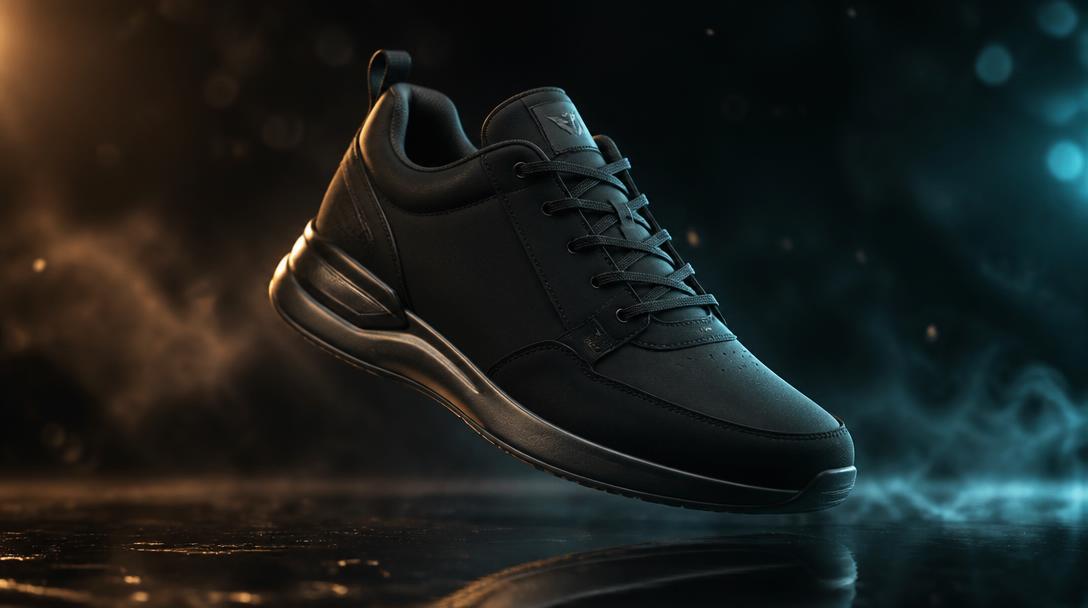 Source image attachedSource still: a matte black sneaker lit with amber and teal studio light
AmmarAI renders
Sample output — the uploaded product still lifted into a rotating hero shot with light sweeps and drifting smoke.
A premium rotating hero shot from one photo — no turntable, no studio, no re-shoot.
Product hero
Input
Uploaded: studio photo of a matte black sneaker. Motion: hover and rotate slowly, light sweeps across the surface, smoke drifts underneath, gentle push in. 5 seconds.
Output
A premium rotating hero shot from one photo — no turntable, no studio, no re-shoot.
Landscape parallax
Input
Uploaded: sunrise mountain photo. Motion: slow aerial drift forward, mist rolling between ridges, real depth separation between foreground and distant peaks. 5 seconds.
Output
A cinematic establishing shot with genuine parallax, cut from a single still frame.
Key features
What the tool gives you
Directed camera movement
Specify the move rather than accepting whatever motion the model invents.
Depth-aware parallax
Foreground and background separate convincingly, which is what makes a still feel three-dimensional.
Ambient animation
Bring life to specific elements while the rest of the frame holds still.
Ratio-preserving output
Animate in the ratio the still was composed for, so nothing important is cropped away.
Who it is for
People who get the most from this
Social media managers
Convert an existing image library into motion content without shooting anything new.
E-commerce teams
Give catalogue photography movement for ads and product pages.
Video editors
Produce B-roll and establishing plates from stills when there is no footage available.
Marketers running ads
Motion creative typically earns more attention in feeds than a static frame.
Workflows
Practical ways teams use it
Static library to motion library
Take the ten strongest images you already own, animate each with a small deliberate move, and you have a month of motion posts.
Ad opener
Animate the hero product shot for the first three seconds, then cut to the text-led body of the ad.
Generated still to clip
Create an image in the AI Image Generator, approve the composition, then animate it here so the campaign visual moves.
Tips that improve results
- Choose images with obvious depth: a clear subject, a distinct background, and space between them.
- Smaller movements look more expensive. Slow beats dramatic almost every time.
- Avoid animating tight shots of faces and hands, where artefacts are most visible.
- Generate a few short variants and pick, rather than requesting one long clip.
- Keep the first and last frames usable as stills so the clip can also serve as a poster image.
Mistakes worth avoiding
- Asking for several simultaneous movements in one clip.
- Animating a low-resolution or heavily compressed source image.
- Requesting long durations and accepting the drift that comes with them.
- Using it where text-to-video would be better, namely when you have no source image at all.
AI Image to Video FAQ
How is this different from text to video?
Text to video invents the shot from a written description. Image to video animates a still you already have, so the content of the frame is predictable and on brand.
How long can the clips be?
Short by design, typically a handful of seconds per generation. Longer sequences are best built by assembling several clips in the video generator.
Can I animate my own photos?
Yes, and that is often the best use. Your real product and location photography animates into far more credible content than generated footage.
Will the image stay exactly the same?
The composition and subject stay recognisable, but fine detail can shift as the frame moves. Small movements preserve the original best.
Related
Tools that pair well with this
AI Text to Video
Generate a video clip directly from a written description of the shot you want.
AI ImageAI Image Generator
Generate high-quality images from text prompts. Create product shots, marketing visuals, social graphics, and more — then edit, upscale, or vary them.
AI VideoAI Video Generator
Create short videos from text prompts or still images. Includes text-to-video, image-to-video, smooth transitions, and options for captions and voiceover.
AI VideoAI Avatar Video Generator
Turn any image into a talking avatar video with realistic lip-sync and natural expressions. Ideal for product explainers, social content, training videos, and personal branding.
AI VideoVideo Script Generator
Write structured video scripts for YouTube, explainers, ads, and presentations.
Try the AI Image to Video free
One AI for everything you create. Start on the free plan and upgrade only when the volume demands it.